Introduction to IMBEIstyle
Federico Marini
Source:vignettes/Introduction_to_IMBEIstyle.Rmd
Introduction_to_IMBEIstyle.RmdIMBEIstyle
The goal of IMBEIstyle is to provide a simple way to create an analysis report, styled up with some fancy options and some UM corporate design colors, and a revealjs quarto presentation, in a similar fashion.
More content could cover the need of e.g. a poster template - especially if doable within the quarto framework.
Installation
You can install the development version of IMBEIstyle like so:
library("remotes")
remotes::install_github("imbeimainz/IMBEIstyle")
Using IMBEIstyle in your documents
Here is how you can create the reports and presentations with this package.
An IMBEIstyle report
IMBEIstyle::create_bioinfo_html(file_name = "myfirstreport",
                                report_folder = tempdir())
#> ℹ Using report folder, /var/folders/l7/zzmm12b945z_f71ljwfqj7z00000gn/T//Rtmp742miX
#> ℹ Created '_extensions' folder into /var/folders/l7/zzmm12b945z_f71ljwfqj7z00000gn/T//Rtmp742miX
#> ℹ bioinfo-html was installed to _extensions folder in the specified report directory.
#> ℹ Copied auxiliary files into the toplevel report folder.
#> You might want to edit the corresponding lines in the yaml section
#> ☐ Edit
#>   /var/folders/l7/zzmm12b945z_f71ljwfqj7z00000gn/T/Rtmp742miX/myfirstreport.qmd.
#> ✔ Have fun with your report - available inside the folder /var/folders/l7/zzmm12b945z_f71ljwfqj7z00000gn/T//Rtmp742miX
Once the source document has been opened (e.g. within the RStudio IDE), you can compile it to see that everything works as expected.
The next obvious steps are oriented towards filling in its contents. For this, you can refer to the creation of any Quarto based document - the Quarto tutorial (https://quarto.org/docs/get-started/hello/rstudio.html) is an excellent place to start.
Once rendered, this is how your report document could look like:
An IMBEIstyle presentation
Similarly, to create a Quarto-based presentation, you can use
IMBEIstyle::create_bioinfo_revealjs(file_name = "myfirstpresentation",
                                    presentation_folder = tempdir())
#> ℹ Using presentation folder, /var/folders/l7/zzmm12b945z_f71ljwfqj7z00000gn/T//Rtmp742miX
#> ℹ bioinfo-revealjs was installed to _extensions folder in the specified report directory.
#> ℹ Copied auxiliary files into the toplevel presentation folder.
#> You might want to edit the corresponding lines in the yaml section
#> ☐ Edit
#>   /var/folders/l7/zzmm12b945z_f71ljwfqj7z00000gn/T/Rtmp742miX/myfirstpresentation.qmd.
#> ✔ Have fun with your presentation - available inside the folder /var/folders/l7/zzmm12b945z_f71ljwfqj7z00000gn/T//Rtmp742miX
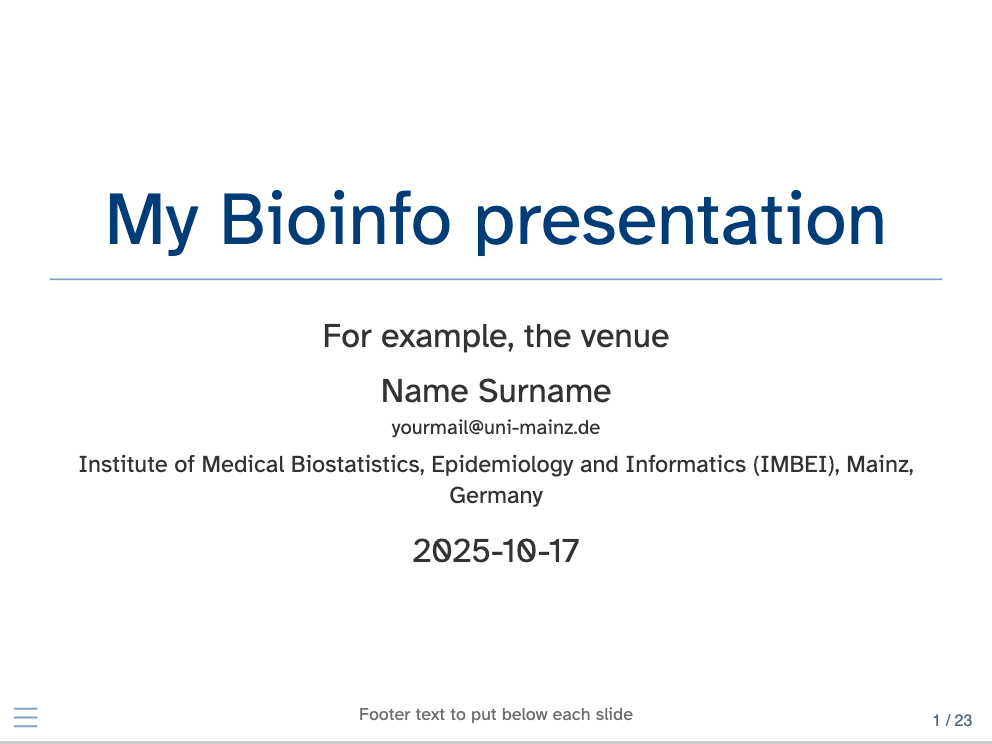
… which again could look like this (this is a static snapshot):
How to further customize the looks of these documents
Some obvious spots to touch on would be
- an alternative font
- alternative sets of colors
- alternative or multiple output types
You can control these and more aspects from the yaml of the
respective documents, and/or changing directly the associated
.scss style files.
Changes in the versions of the provided template documents
So far, this is the first iterations on these documents.
In case newer versions are deployed, some notable changes can be reported in the content of this section.
Session info
sessionInfo()
#> R version 4.5.0 (2025-04-11)
#> Platform: x86_64-apple-darwin20
#> Running under: macOS Sequoia 15.6
#>
#> Matrix products: default
#> BLAS:   /Library/Frameworks/R.framework/Versions/4.5-x86_64/Resources/lib/libRblas.0.dylib
#> LAPACK: /Library/Frameworks/R.framework/Versions/4.5-x86_64/Resources/lib/libRlapack.dylib;  LAPACK version 3.12.1
#>
#> locale:
#> [1] en_US.UTF-8/en_US.UTF-8/en_US.UTF-8/C/en_US.UTF-8/en_US.UTF-8
#>
#> time zone: Europe/Berlin
#> tzcode source: internal
#>
#> attached base packages:
#> [1] stats     graphics  grDevices utils     datasets  methods   base
#>
#> other attached packages:
#> [1] IMBEIstyle_0.1.0
#>
#> loaded via a namespace (and not attached):
#>  [1] vctrs_0.6.5       cli_3.6.5         knitr_1.50        rlang_1.1.6
#>  [5] xfun_0.53         purrr_1.1.0       textshaping_1.0.3 jsonlite_2.0.0
#>  [9] glue_1.8.0        htmltools_0.5.8.1 ragg_1.5.0        sass_0.4.10
#> [13] rmarkdown_2.30    tibble_3.3.0      evaluate_1.0.5    jquerylib_0.1.4
#> [17] fastmap_1.2.0     yaml_2.3.10       lifecycle_1.0.4   compiler_4.5.0
#> [21] fs_1.6.6          pkgconfig_2.0.3   htmlwidgets_1.6.4 rstudioapi_0.17.1
#> [25] systemfonts_1.3.1 digest_0.6.37     R6_2.6.1          pillar_1.11.1
#> [29] usethis_3.2.1     magrittr_2.0.4    bslib_0.9.0       tools_4.5.0
#> [33] pkgdown_2.1.3     cachem_1.1.0      desc_1.4.3